Laura S. Marshall
AccessiTrail
2023 / iPhone App

Roles:
I was the self-directed lead UX/UI designer and researcher for this project. I conducted all user research, wireframing, prototyping, visual design, and testing for this project.
Date:
December 2023 (4 weeks)
Tools:
Figma, Google Workspace
Overview
The problem: Many hiking and outdoors apps exclude disabled hikers and outdoors enthusiasts because they do not provide sufficient (if any) accessibility information about difficulty, incline grade, surface material, visibility, and other factors. Disabled users are often unable to determine whether a trail is accessible for their purposes based on online descriptions and reviews. They either have to take their chances and try the trail for themselves, or stay home and miss out.
The AccessiTrail app and responsive website allows disabled hikers to find and review accessible trails, plan their hiking trips, suggest new trails to add to the database, and connect with other disabled outdoors enthusiasts.
User Research
Summary: To understand the problem, I conducted user interviews, created empathy maps, and built user personas to guide my design. My research revealed that disabled hikers were quite frustrated by the lack of accessibility information on existing trail apps, and that they often avoided trails that might actually be accessible to them because of scant details about trail specifications.
- Pain Point: Details
Most hiking apps offer subjective classifications such as “strenuous,” “moderate,” or “easy,” but these classifications are often not well defined or consistent across trails or accurate for all users. - Pain Point: Inclusion
Because of historical exclusion of disabled users from existing hiking apps, reviews on these apps are often not written with disability in mind. - Pain Point: Tech
Hiking and outdoors apps are often extremely focused on visual cues such as maps and text-based directions; many do not offer turn-by-turn voice-guided navigation. - Pain Point: Time
Many disabilities can make everyday tasks take longer. Many disabled users don’t have a lot of extra time and energy to hunt for hiking trails that will be accessible for them.

User persona: During the empathize phase of the process, a user persona arose. This target persona, based on my research, informed my design choices and made my product more useful.
Sylvie, 37, is a coffee shop manager and wheelchair user who needs a quick, easy, accurate way to find wheelchair-accessible hiking trails so she can enjoy the outdoors with friends, family, and coworkers.
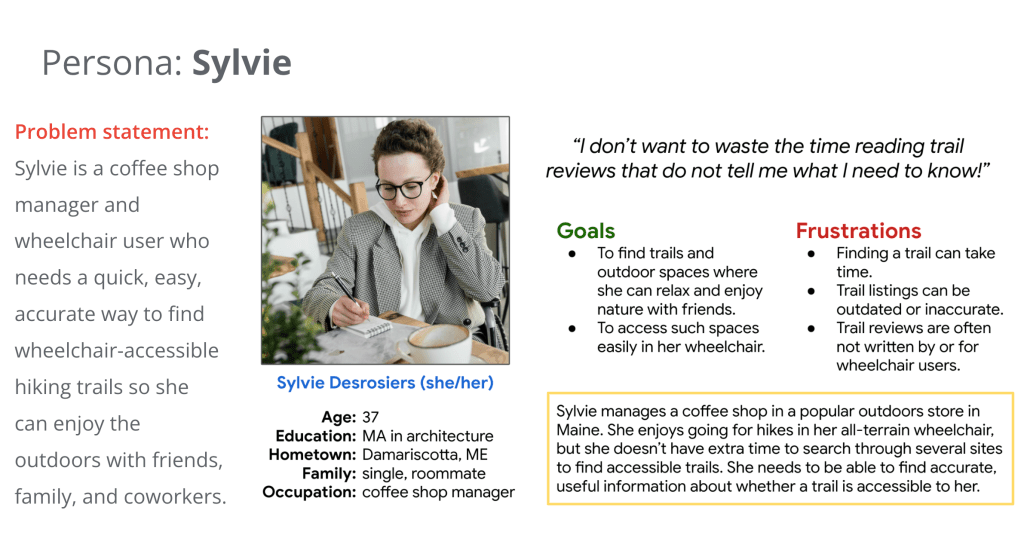
Mapping Sylvie’s user journey helped me to see where current solutions failed the disabled community and where we could develop improvements. I could see how important it would be to include well-defined and consistent difficulty ratings, as well as in-app user reviews and a range of trail access details: incline, width, surface type, etc.

Several must-have features emerged during this phase:
- Inclusive reviews and photos uploaded by disabled hikers themselves
- Consistent difficulty ratings for each trail
- In-app download capability so users can follow the trail maps offline
- Trail suggestions for quick and easy viewing
Ideation and Design

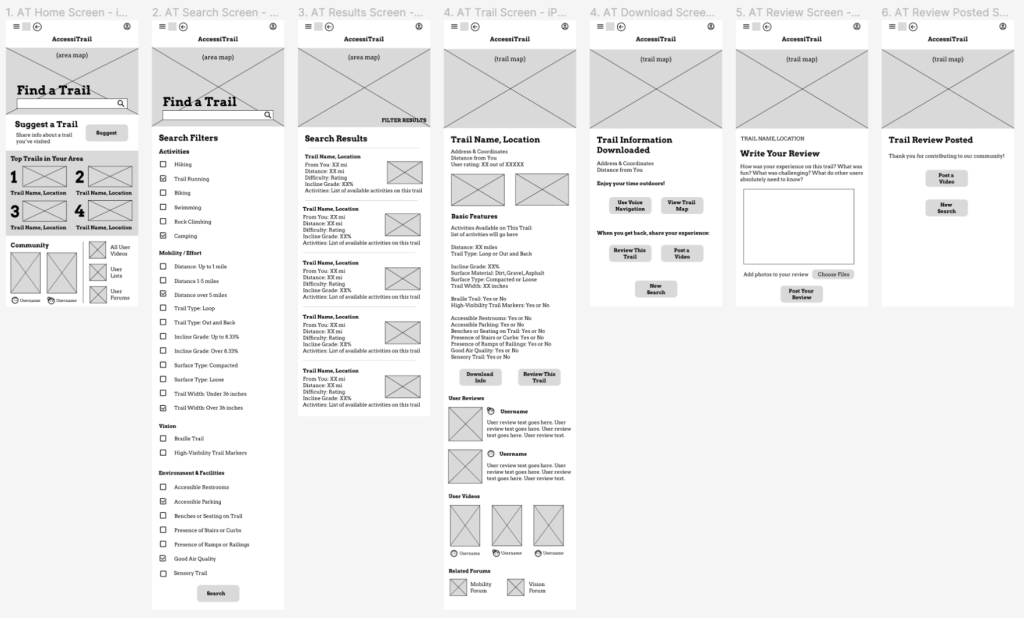
Paper wireframes: I wanted the AccessiTrail home screen to give users what they need: a simple, clear header with the app logo, a nav menu, and an account button; a prominent search bar; top trails near them; a way to suggest adding new trails to the app; and a community section where they can connect with other disabled hikers. You’ll see these elements in the Refined Version (bottom, far right).
Digital wireframes: The digital wireframe for the AccessiTrail app’s home screen and search function was designed for clarity, based on user research that showed users want to be able to find nearby accessible trails quickly and easily.


Low-fidelity prototype: My low-fidelity prototype followed the user flow through searching for and selecting a trail, downloading its map, and posting a review, so users could test the product’s usability. View the AccessiTrail app lo-fi prototype here.
Usability Study
Once we had a lo-fi prototype, we needed to find out whether it was easy enough to search for, view, download information about, and review a trail on the app. We hoped to understand the specific challenges users may encounter in the search, download, and posting processes, so that we could fix those issues before launch.
Research questions:
- How long does it take to find a trail in the app?
- What steps do users take in choosing a trail?
- What frustrations do users encounter in the app?
- How often do users download trail details in the app?
- How much time, on average, do users spend in choosing a trail?
Methodology and participants: This was an unmoderated usability study, held remotely; each of the five participants went through the test on their own at home. Each session lasted 60 minutes and included an introduction, a list of tasks, and a brief questionnaire.
Participants were all Albany, NY-area residents who are adults and who self-identify as having a disability. They were chosen from a screening survey given to members of a local outdoors Facebook group. As an incentive, we gave each a $20 gift card to a local eatery. The participants were two females, one male, and two nonbinary individuals, all between the ages of 20 and 75. One participant had limited technical literacy.
Observing users showed that the app could use the following fixes:

Mockups and Prototyping
Low-fidelity mockups
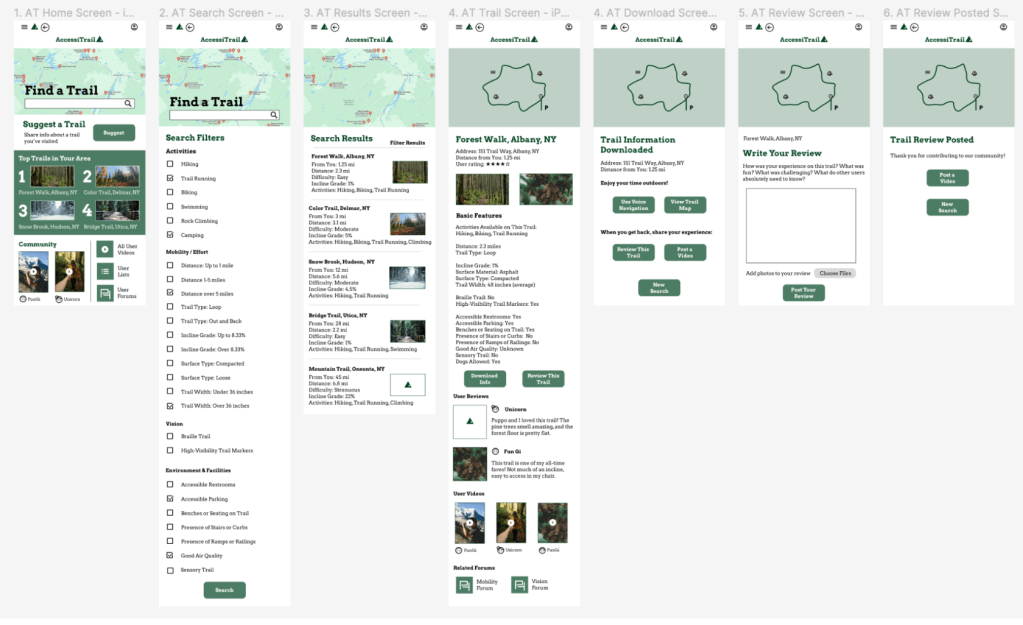
High-fidelity prototype: The high-fidelity prototype followed the user through finding a trail, from searching and selecting a trail through downloading info and posting a review, so users could test the app’s usability. View the AccessiTrail app high- fidelity prototype here.
More usability testing
In a second round of our usability study, we found that users wanted more input on the difficulty ratings for each trail, and that automatic video captioning capability would be beneficial.

Accessibility considerations:
- For easier viewing, I chose to use high-contrast colours like dark green, white, grey, and black. I checked accessible-colors.com to ensure the combinations were accessible for all viewers.
- For screen-reader accessibility, I used Arvo, one of the most accessible serif fonts.
- For ease of use, I made all major call-to-action buttons dark green so users will know they need to click there. I also made button text simple and clear so users with various linguistic backgrounds can follow the instructions.
Takeaways
Impact: The AccessiTrail app and responsive website allow users to find accessible trails quickly and conveniently from multiple devices.
One research study participant commented, “I would use this on weekends and especially when traveling to find trails I can actually enjoy.”
Another shared, “I trust these trail reviews more than others, knowing that they were written by disabled people like me.”
What I learned: This project taught me how important it can be to create a sense of community among users; we achieved this by highlighting that our users were reviewing trails from their own experiences as disabled hikers. Working with feedback from usability studies helped me make the app more useful and accessible for all users.
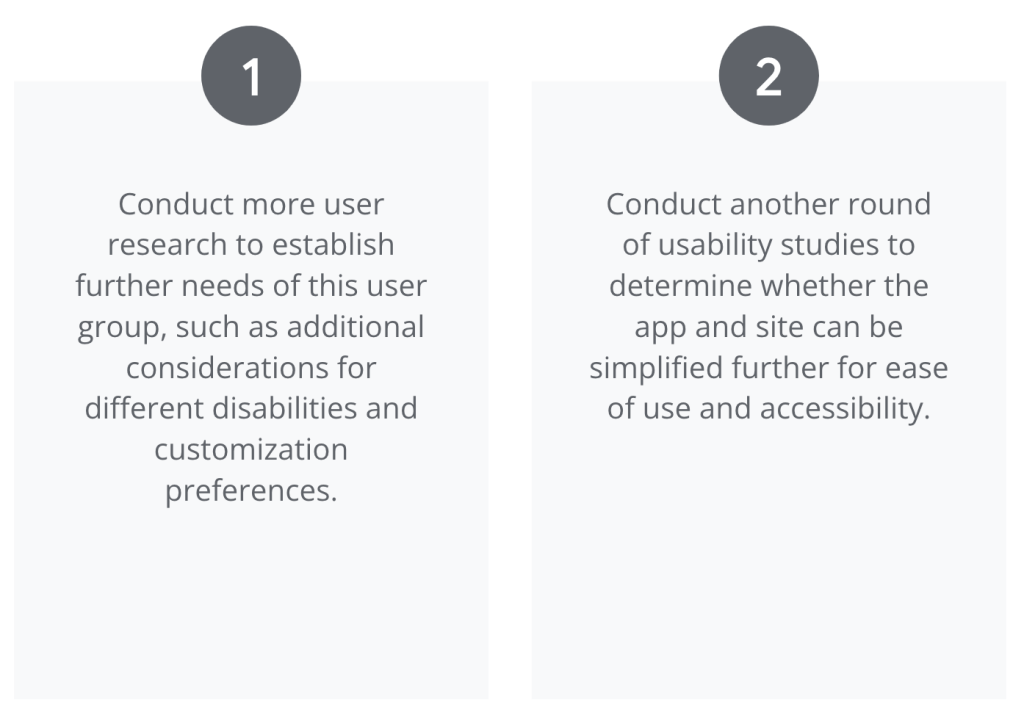
Next steps
Thoughts
Technology can connect us beyond email and social media; apps and websites can bring scattered members of a community together, virtually, to share and create knowledge. AccessiTrail allows users to help themselves and others participate in outdoor activities from which they previously might have been excluded for simple lack of information. Further, this app empowers disabled people to suggest the addition of new trails, post reviews in their own words, and share photos and videos of their own experiences with others.
This project was based on deep empathy and was inspired by an understanding of the daily challenges faced by people with disabilities. As a designer with a disability myself, my commitment was fueled by the desire to solve the problem of exclusion in the outdoors. I wanted to build a quick and easy solution that would give my fellow humans a way to get outside — in the way that will best meet their needs.
 Laura S. Marshall